Sun JavaStation Krups (aka NC) - 2025

The JavaStation Krups (aka JavaStation-NC for it's official name) was a ~2000 era thin-terminal device made by Sun, I've got one which used to be in Manchester computer science dept.

Top view of JavaStation Krups Back of a JavaStation Krups

from wikipedia andunder CC BY-SA 4.0, Adrian Cockroft

My main notes here are on getting Linux running on it, booting off a modern Linux host, with some notes on how to rebuild kernels.

The Krups is not that different from a SPARCStation (4ish) but has very limitted IO. The only permanent storage is a removable Flash DIMM that is supplied with JavaOS. It's also different enough to need it's own Linux kernel build.

Existing websites

Lots of people have also written their own webpage on these devices, this one is from 2025, so some of the boot information is a little newer, but all these other sites generally pointed me in the right direction. I've included what I believe are the newest kernels available for the Krups.

  1. The Sun JavaStation NC Howto from 2001
  2. Robert H. Thornburrow's site from 2023

The boot process

To boot Linux, the challenges are to:
  1. Avoid JavaOS
  2. Netboot Linux

Avoid JavaOS

While other docs have mentioned keyboard shortcuts during boot to avoid booting JavaOS, I've not managed to make any of those work; one possibility is that is because I'm not using a real Sun keyboard on it, although the ctrl-alt-esc combination does bring the help menu up (only if the NIC is plugged in).

Like most SPARC systems, it has openprom boot firmware, although that seems more limited than other SPARC systems I remember. Hitting break on the serial near the start of boot gets into it's prompt, and can be used to manually boot from there.

However, having to hit break at just the right point on each boot is a pain, so I took the JavaOS SIMM out. It was in the white socket on the right hand side in the picture below:
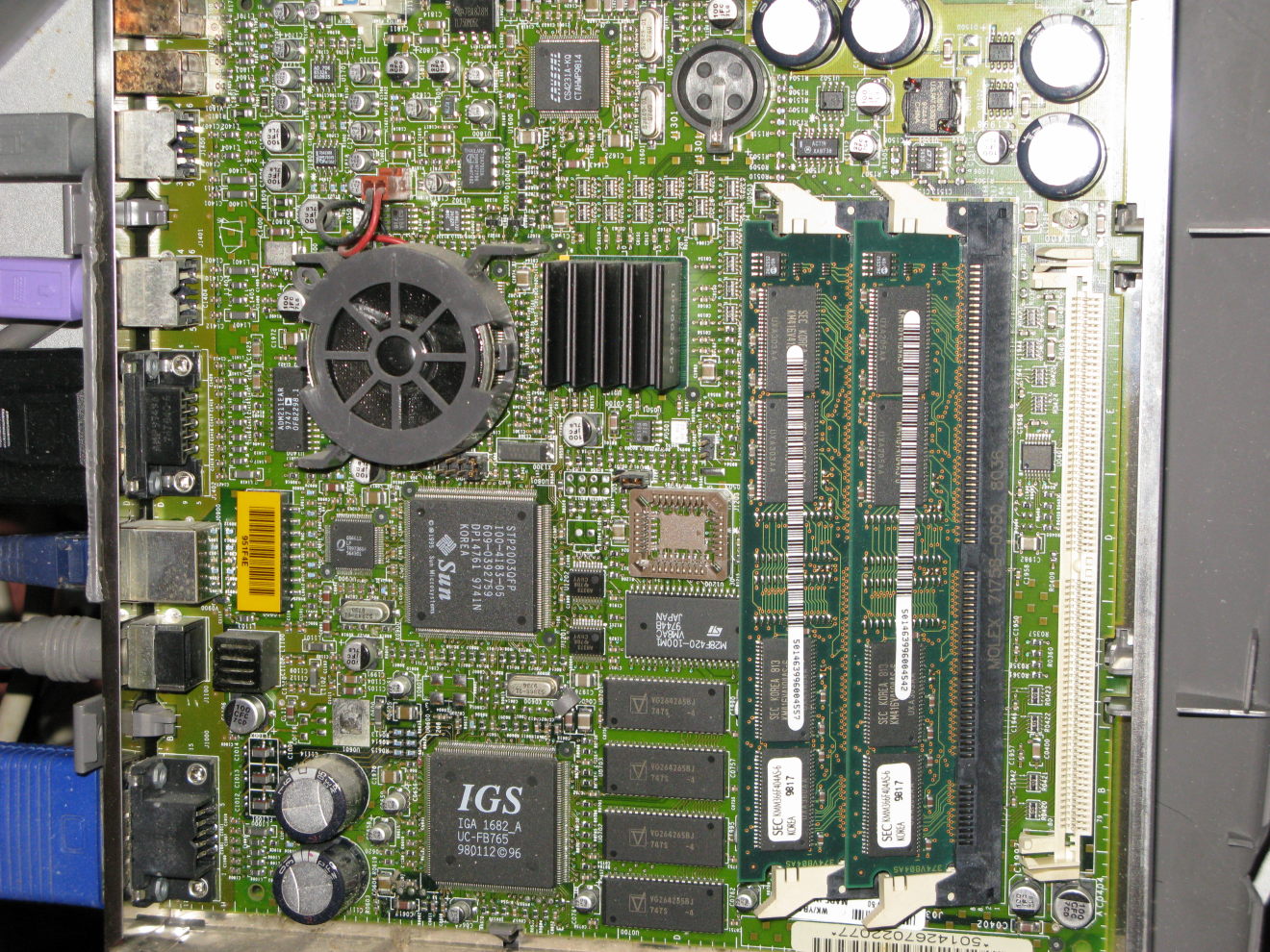
The JavaStation PCB

The trickiest bit of this is opening the case, which is plastic clipped together - on my Krups the plastic is brittle and a lot of the clips completely popped off, and I cracked one side - so be more careful than me!.

Netbooting Linux

The JavaStation ethernet is connected to a segregated LAN, with a Debian Trixie Linux server acting as DHCP server. On this server, the DHCP server is provided by the modern kea system rather than the older isc package. Care needs to be taken to get the config just right since the Krups firmware can be a bit picky.

Remember to ensure your firewall lets the dhcp and bootp etc through

Setting up bootp/dhcp

The 'kea' DHCP server is configured using the file /etc/kea/kea-dhcp4.conf. I started with the basic dhcp4.conf example and added entries.

First I specified for it to only run on the isolated interface I was using for the JavaStation:


"interfaces": [ "enp4s0" ]

Then, since the JavaStation actually uses the older bootp rather than dhcp, this needs enabling in kea:


    "hooks-libraries": [
      { "library": "/usr/lib/x86_64-linux-gnu/kea/hooks/libdhcp_bootp.so" }
    ],
Then having configured a subnet range, I create an explicit reservation:

    "reservations": [
        {
            "hw-address": "08:00:20:95:1f:4e",
            "ip-address": "192.168.69.2",
            "next-server": "192.168.69.1",
            "boot-file-name": "C0A84502"
        }
    ]
Note here that the 'next-server' is the IP address of this server on which a TFTP server will be running, and the boot filename is just the IP address of the JavaStation in hex.

I also added an entry for that IP address in my /etc/hosts as 'krups'.

TFTP booting Proll

The firmware will fetch the filename listed in the boot-file-namesection of the DHCP config. For booting Linux on the JavaStation this needs to be a loader called Proll.

First install the tftpd (I installed debian's tftpd-hpa package) and figure out where it ones files, in my case it serves from /srv/tftp/.

Next download:
My proll build
and put it in the tftp server directory (i.e. /srv/tftp/). Create a symlink from it to the hex for each javastation you need to boot:


ln -s javastation-krups-proll.19dagb C0A84502
Once loaded, Proll will then load two files with a similar name to the original, one with the extension .CMDL containing the command line to pass to Linux, and the Linux kernel itself, which needs to be in a file with ending .PROL.

(Note: Older versions of Proll didn't all load the .CMDL file, I enabled it in my build so I could specify some NFS flags)

Create /src/tftp/XXXXXXXX.CMDL (fill in your hex IP) with your favourite editor with the content:


ip=bootp root=/dev/nfs nfsroot=/tftpboot/%s,v3 console=ttyS0 debug

These are parameters to the guest kernel we're about to boot, the '%s' is expanded to a decimal IP address of the guest, and the v3 is specifying the NFS version. Specifying v3, and having a v3 enabled JavaStation kernel is needed since newer Linux hosts don't support v2 any more.

I've built two kernels that are suitable for this configuration, with NFSv3 enabled, details on building them is included below, but here are the images:

My 2.4.27 build

My 2.5.1 build

Download these into the tftp directory and then symlink one to XXXXXXXX.PROL.

If all works well, then when powering on the JavaStation, after a few seconds you should see the Proll boot messages in the bottom right of the monitor: Proll starting booting
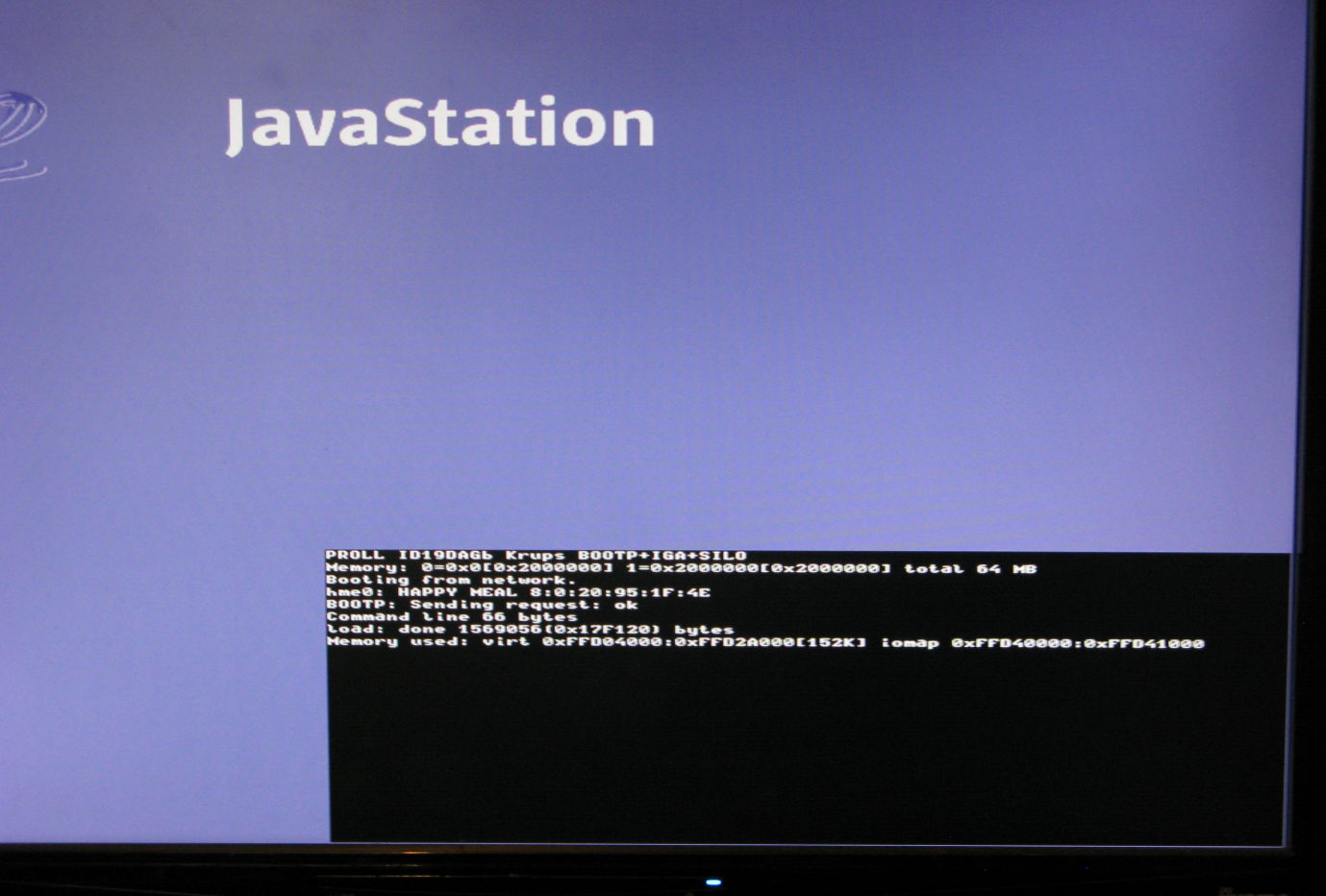
After a few seconds this should be replaced by a full screen Linux console with Tux (and a sun burst) at the top left. This can't boot fully yet however since we haven't got a root filesystem.

Building a root filesystem

I used an old debian install as the root filesystem for my JavaStation by using debootstrap. My main reason for using an old Debian was to find one that was a similar age to the kernels I'll be running on the JavaStation so they don't try and use more modern syscalls and /sys entries.

On the host, install qemu-user (which tends to make cross architecture debootstrap more reliable). Then did:


debootstrap --arch=sparc sarge /opt/sarge/home/sparc
I then created a symlink from /tftpboot/192.168.69.2 to /opt/sarge/home/sparc , installed nfs-kernel-server on the host and created an export line in /etc/exports

/opt/sarge/home/sparc  krups(rw,no_root_squash)

Debootstrap only does a very basic install, so it may need some cleanup - and remembering this is a very old Linux most of this is in the simpler older config files such as /etc/inittab. I commented out all except the tty1 and ttyS0 entries in inittab, just leaving a single console and a serial console.

If this has all worked out right you should be able to see a Linux userspace booting: Linux booting

Building Proll and the Kernel

The kernel and Proll builds linked above should be enough if you just want to boot a Krups, however, source and notes on building them are incldued here.

Building old code tends to need old tools, and there's some guess work to be done in finding a good combination that works. In addition, building old compilers can also need old tools. Fortunately building old code on new machines is at least fast, even for gcc and a kernel.

A starting point

As a basic starting point, I used Debian Sarge, which was released in 2005, and installed an x86 debootstrap in a directory on the same host I've been booting the JavaStation from. I can then easily chroot into that.

Building cross tools

We need cross binutils and gcc. At first I tried x86 Sarge's binutils-multiarch but it doesn't have as and ar. Using Sarge's own binutils and gcc configured for SPARC works reasonably well; if we need any SPARC user space or headers we can take a copy from the SPARC root filesystem we created.

apt-get source binutils
apt-get source gcc-3.3
This gets me the source to Debian's patched binutils-2.15 and gcc-3.3.5-13.

In the binutils-2.15 directory that has been created:


./configure --program-prefix=sparc-linux- --prefix=/home/cross/build --target="sparc-linux"
make
make install
This produces a binutils set in /home/cross/build. Note I found out this version isn't parallel build safe, hence the plain make.

In the gcc-3.3-3.3.5 directory that has been created:


export PATH=/home/cross/build/bin:$PATH
./configure --program-prefix=sparc-linux- --prefix=/home/cross/build --target="sparc-linux"
make
make install -k

Note the make will fail as it tried to start building some userspace libraries we don't need, the -k on the make install tells it to ignore errors and plough on. This got me enough to work with, including sparc-linux-gcc.

elftoaout

Proll wants a.out format kernel images, where as the tools generate ELF format, an old program called elftoaout is used at the end of the kernel build to convert the images. elftoaout is tricky to find these days, I eventually found one in the openSUSE leap 15.5 repo, and have included a copy here. I built this using:

rpm2cpio elftoaout-2.3-bp155.2.10.src.rpm
cpio -idv \< ../elftoaout-2.3-bp155.2.10.src.rpm.tar
tar -xvzf elftoaout-2.3.tgz
make
Note: rpm2cpio produced a file ending in .tar, however it turns out to be a cpio. The RPM also had a patch in it that didn't look relevant and which I ignored. I ran rpm2cpio on a separate machine in my case.

Building Proll

My modified Proll tree is available both on GitLab and as a local tar. It is a lightly modified version of the version 18 I found on archive.org, converted from CVS and patched to build with the cross gcc and binutils listed above, and then modified to allow the separate command line file (which already existed on some other configurations). I've only tried this on the Krups.

To build it, just ensure the cross tools are in PATH and then, inside the krups directory issue:


make CROSS=sparc-linux-

Building Linux 2.4.27 kernel

The newest kernel I'd been able to find online for the JavaStation was a 2.4.3, so starting with a more recent 2.4 seemed a good idea. Since this is before the use of Git, and the Debian Sarge world being used also had a 2.4.27 kernel it was easiest to grab debian's tree with:

apt-get source kernel-source-2.4.27
I manually unpacked the tar and applied just this part of one of the Debian patches to get it to build. I used this config which was based on one I found on archive.org that had originally come off 'dubinski-family.org'.

To build,


make ARCH=sparc CROSS_COMPILE=/home/cross/build/bin/sparc-linux- oldconfig
make ARCH=sparc CROSS_COMPILE=/home/cross/build/bin/sparc-linux- vmlinux
This produces a ELF format file in vmlinux, which we can then convert to a.out using the elftoaout we built above:

./elftoaout -o vmlinux.aout vmlinux
This can then be copied into the tftp directory as XXXXXXXX.PROL (or symlinked).

Building Linux 2.5.1 kernel

Having got a working 2.4, I wanted to move forwar, but couldn't get a 2.6 building, so went to 2.5. 2.5 however isn't generally in distros, and is still before Git. Fortunately, I found Jeff Mahoney's git repo which has reconstructed the pre-git BK versions. Commit 650f733976e7e0f25cce57ff19e2f221c46c3c83 in that (corresponding to BKrev 3c6071d5t7MsPmVkUVmBvZNcKfms0g) was my starting point which I believe to be 2.5.1. On top of that I needed to do a bunch of backports and hacks until I got something to boot.

This resulted in my hacky patch and config.

This can be build in the same way as 2.4 above.

Failing at Linux 2.6.x

I've not managed to get a working 2.6 boot. My closest so far has been a 2.6.8.1 with the i8042 (keyboard/mouse) and console configured out. My suspicion is that there is something off about the way IO space is being accessed.

Early 2.6 etc didn't have the level of CI of modern Linux, many versions just didn't build for SPARC for example. So finding a good starting point is tricky.


Troubleshooting

  1. tcpdump is your friend when looking at early boot failures before the kernel has loaded.
  2. If you've configured your DHCP server to only serve a separate interface, it often requires that the interface is up when the DHCP server is started. Thus if you're just using a cable to the JavaStation you need to turn it on, then start the DHCP server (and then possibly restart the JavaStation if it timed out waiting for the DHCP and displayed a ? in the corner).
  3. All my tests have been done with a PS/2 keyboard plugged in, I've seen suggestions the boot flow is different when there isn't one.
  4. The boot prom is visible on the serial console, as is the kernel console.
  5. With an NFS root, the logging happens over NFS, so once the kernel and userspace is running you can just look at the log in /tftpboot/<ipaddress>/var/log
  6. For early kernel debug, qemu-system-sparc can boot the aout kernel directly, with a line like qemu-system-sparc -kernel ./vmlinux.aout -M SS-4 -nographic. This has helped me debug some early failures, but I've got versions that fail on real hardware but work there, possibly since it isn't quite a SparcStation-4.

  7. mail: fromwebpage@treblig.org irc: penguin42 on libera.chat | matrix: penguin42 on matrix.org | mastodon: penguin42 on mastodon.org.uk


    back to Dave Gilbert's Home Page